MyMirrorClub Event Gallery is an event photo gallery with QR code guest uploads, messages, optional password protection, photo approval controls, printable QR posters and a permanent gallery link. It gives event hosts, photo booth companies and event professionals a simple way to collect the photos guests are already taking on their phones and keep them together in one organized online gallery.
Instead of asking everyone to text photos after the event, join a group chat, download a special app or remember where to send pictures later, guests simply scan the event QR code. They can take a new photo with their phone camera or choose existing photos, add their name and a message if enabled, and upload directly to the event gallery.
What is an Event Photo Gallery?
An event photo gallery is a shared online space created for one event, such as a wedding, birthday, quinceañera, baby shower, corporate event, family celebration or private party. Guests contribute photos from their phones while the organizer controls how the gallery behaves.
The difference with MyMirrorClub Event Gallery is that the gallery is not only a place to display finished photos. It also includes the collection workflow. Each event receives a permanent event link and QR code that can be shared digitally or printed for the event itself.
How the QR Code Event Photo Gallery Works
- Create an Event Gallery. Add the event name and date, then choose a visual style.
- Choose the event settings. Decide whether guest uploads are enabled, whether messages are allowed, whether a guest name is required, and whether photos appear instantly or need approval first.
- Add optional password protection. If the event should be more private, protect the gallery with a password that guests must enter before accessing it.
- Create the QR poster. MyMirrorClub generates a printable poster connected to the permanent event link.
- Put the QR code at the event. Print the poster for guest tables, the welcome area, bar, photo booth station or anywhere people will notice it.
- Guests scan and upload. Guests open the gallery in their phone browser, take a photo or choose photos already on the device, then upload them to the event.
- Everyone enjoys the memories. Approved photos appear in the themed Event Gallery and can be viewed full size.
No App Required for Guest Photo Uploads
One of the most important parts of an event photo sharing system is making it easy enough that guests will actually use it. MyMirrorClub does not require guests to install an app. The QR code opens the Event Gallery directly in the browser.
Guests can choose Take Photo to use the device camera or Choose Photos to select pictures already stored on the phone, tablet or computer. Up to 20 photos can be selected in one upload batch. A large preview helps the guest confirm the selected image before uploading.
Collect Guest Names and Messages with the Photos
Event photos can become more meaningful when the person who shared them can also leave a note. Event Gallery can collect an optional guest name and message together with the uploaded photo.
The organizer controls this behavior. Guest messages can be enabled or disabled, and the guest name can be optional or required. When guest photo uploads are disabled, the related guest message option is also disabled so the public experience stays clean and logical.
Password-Protected Event Photo Galleries
Yes, an Event Gallery can be password protected. This is useful for weddings, private family events, corporate gatherings, school events, invitation-only parties or any event where the organizer does not want the gallery freely accessible to anyone who receives the link.
The password is optional. Public events can remain simple and scan-to-open, while private events can add the extra access step. The organizer can also change or remove the gallery password later from Event Gallery Settings.
Show Photos Instantly or Approve Them First
Not every event needs the same moderation rules. MyMirrorClub lets the organizer choose between two guest photo approval workflows.
- Show guest photos instantly: uploaded photos can appear in the Event Gallery immediately.
- Require approval: uploads remain pending until the gallery owner approves them.
This makes the same Event Gallery useful for a casual birthday party as well as a corporate event or formal celebration where the organizer wants more control over what appears publicly.
Printable QR Code Posters for the Event
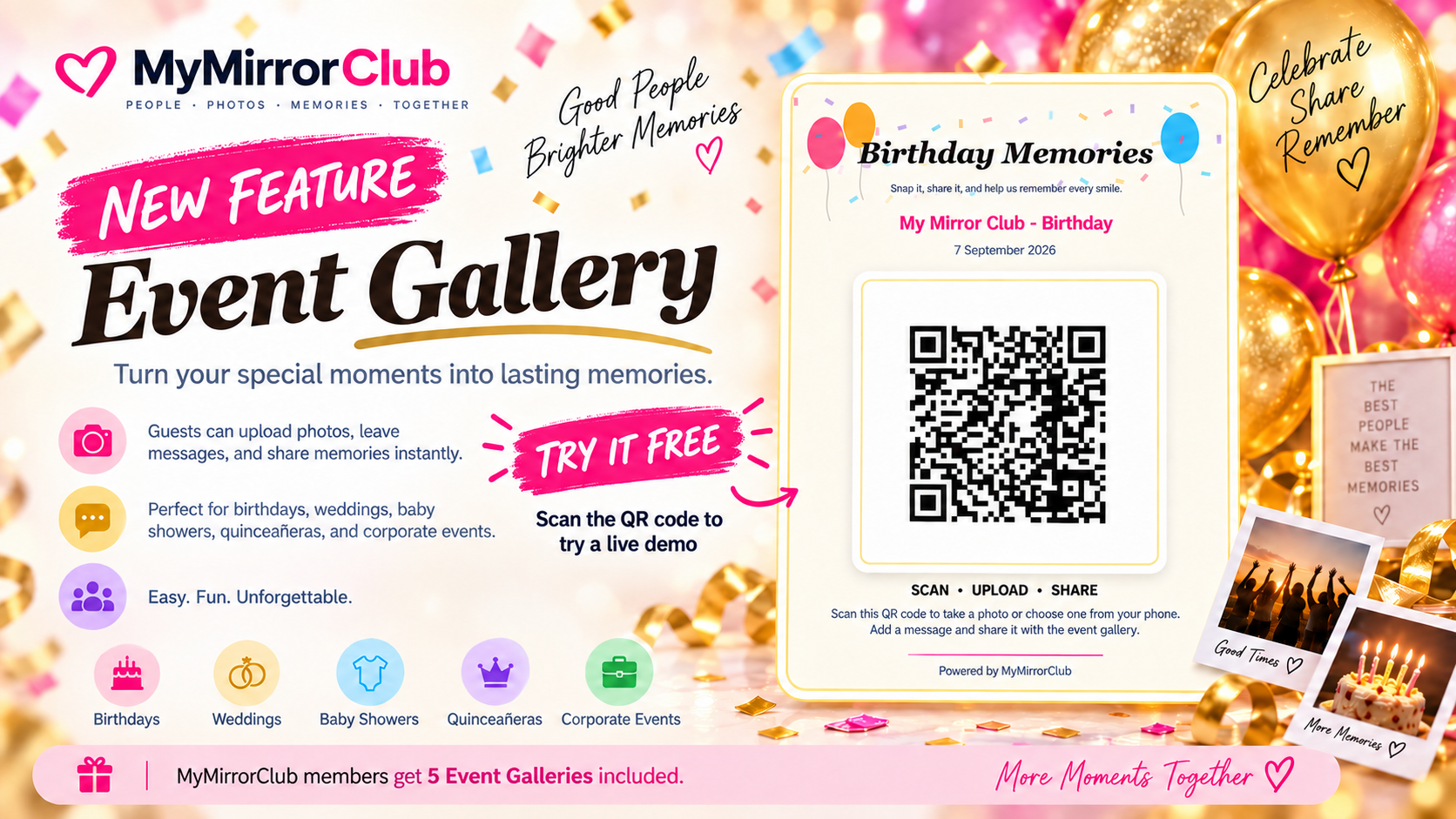
Every Event Gallery can generate a QR poster designed for real event use. The poster includes the event name, date, guest instructions and a large QR code connected to the permanent gallery link.
The QR poster can be downloaded as a PNG or printed/saved as a PDF. MyMirrorClub includes different poster treatments for Wedding, Birthday, Corporate, Quinceañera, Baby Shower and Generic / Minimal events, so the sign feels like part of the event rather than a plain technical QR code.
A typical table sign can tell guests exactly what to do: Scan • Upload • Share. That makes the QR code useful at guest tables, welcome tables, photo booth areas and event entrances.
The Event Gallery Matches the Event Style
The visual style is carried into the actual public gallery too. Birthday galleries can use celebratory balloons and confetti-inspired details, wedding galleries use a more elegant presentation, corporate galleries stay cleaner and more structured, and the remaining event styles receive their own themed treatment.
This matters because the Event Gallery can stay online after the party is over. It becomes part of the memory of the event, not simply a temporary upload form.
A Real Photo Gallery Experience After Upload
Once photos are inside the gallery, visitors can tap any image to view it larger. The full-screen viewer includes previous and next navigation, keyboard arrow support on desktop, Escape to close and swipe navigation on phones and tablets.
Portrait and landscape images appear in consistent gallery tiles while the full-size viewer preserves the complete photo. Guest names and messages stay connected with the image so the gallery feels more personal than a folder of anonymous files.
Live Event Photo Sharing Without Constant Screen Flicker
During a live event, new photos may arrive throughout the evening. Event Gallery checks for new approved memories silently. If nothing has changed, the existing gallery remains untouched. When new photos are actually available, the gallery can update without repeatedly flashing a loading state on the screen.
There is also a manual Refresh control whenever the organizer or guest wants to check immediately.
Download All Event Photos as a ZIP
The Event Gallery owner can download all gallery photos together as a ZIP file. For larger galleries, the interface shows that the ZIP is being prepared and temporarily disables the download control so the same archive is not accidentally requested multiple times.
This gives the organizer a straightforward way to preserve the collected event photos after the event or move them into another archive, album or client-delivery workflow.
Keep the Same Gallery Link After the Event
The QR code points to the permanent Event Gallery link. During the event, guests can scan it to contribute photos. After the event, the same link can remain useful for viewing the memories that were collected.
The organizer can turn guest uploads off when the collection period is finished. The gallery can then operate simply as a viewing gallery without unnecessary upload buttons.
Event Gallery Ideas for Weddings, Birthdays and More
A QR code photo gallery can fit many types of events:
- Weddings: collect candid guest photos from the ceremony, reception, dance floor and tables.
- Birthday parties: capture cake photos, family moments, selfies, gifts and party memories.
- Quinceañeras and Sweet 16 events: gather formal photos and spontaneous moments from friends and family.
- Baby showers: collect guest photos and messages for the parents-to-be.
- Corporate events: collect team photos, booth photos, conference memories, launches and company celebration pictures.
- Private celebrations: reunions, anniversaries, graduations, holiday parties and other events where many people are taking photos.
Event Photo Gallery for Photo Booth Businesses
For photo booth companies, Event Gallery can also be offered as an added event service. The booth operator can prepare the gallery and printable QR poster before the booking, place the sign beside the booth or on guest tables, and give the client a single place for booth photos plus additional candid guest memories.
Because guests can contribute directly from their own phones, the gallery can extend the experience beyond the physical photo booth itself.
Event Gallery Access for MyMirrorClub Members and Non-Members
Active MyMirrorClub membership includes up to 5 active Event Galleries. This gives members room to manage multiple current events while still protecting the platform from unlimited unused galleries consuming server storage.
Non-members can purchase Event Galleries individually at the current price shown inside MyMirrorClub. Members who are already at their included active-gallery limit can also purchase additional galleries individually. Pricing is controlled from MyMirrorClub rather than being fixed inside the Event Gallery feature.
Each individual paid Event Gallery covers that gallery creation. Deleting a paid gallery later does not turn the original payment into a reusable gallery credit.
Why Use a QR Code Event Photo Gallery?
The main advantage is convenience. Guests are already taking pictures. A QR code gives them an immediate destination for those pictures while they are still at the event.
- No special guest app to install.
- One event link for uploads and viewing.
- Optional password protection for private events.
- Guest names and messages can travel with the photos.
- Instant publishing or organizer approval.
- Themed event gallery and printable QR poster.
- Full-size gallery viewing with next/previous navigation.
- Silent live updates when new approved photos arrive.
- Download all photos as a ZIP.
- Keep the same gallery available after guest uploads are closed.
How to Start an Event Photo Gallery
Sign in to MyMirrorClub and open Event Gallery from your account menu. Create the event, choose the style and privacy settings, generate the QR poster and place it where guests can scan it.
If you are not a member, MyMirrorClub can offer Event Gallery as an individual paid feature. If you run events regularly, membership includes up to 5 active Event Galleries together with the broader MyMirrorClub creative tools.
FAQ: What is an event photo gallery?
An event photo gallery is a shared online gallery created for a specific event where photos can be collected and viewed in one place. MyMirrorClub adds QR code guest uploads, messages, themes, moderation controls and downloadable photos to that workflow.
FAQ: How does a QR code photo gallery work?
The organizer creates the Event Gallery and prints or shares its QR code. Guests scan the code with their phone, open the gallery in a browser, take a photo or choose existing photos and upload them directly to the event.
FAQ: Can an Event Gallery be password protected?
Yes. MyMirrorClub Event Gallery supports optional password protection. The organizer can set a gallery password for private events and can later change or remove it from Event Gallery Settings.
FAQ: Do guests need to download an app?
No. Guests can use the Event Gallery directly in their phone browser after scanning the QR code. They can take a new photo or choose photos already on the device.
FAQ: Can I approve guest photos before they appear?
Yes. The organizer can choose to show guest photos instantly or require approval first. Pending photos can be reviewed from the Event Gallery management area.
FAQ: Can I download all Event Gallery photos?
Yes. The gallery owner can prepare and download all gallery photos together as a ZIP file.
Ready to collect the photos everyone is already taking? Sign in to MyMirrorClub, open Event Gallery and create a QR code event photo gallery for your next celebration.