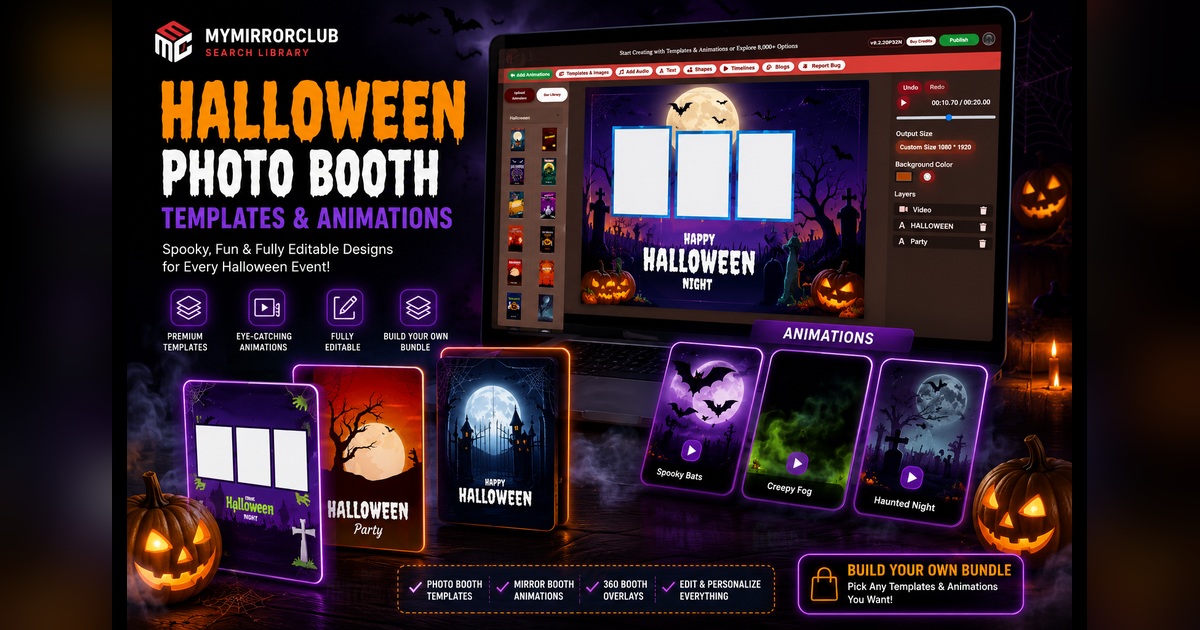
Halloween is one of the best seasons for photo booth owners to offer something visually exciting. Guests expect bold colors, glowing pumpkins, haunted scenes, spooky characters, animated screens and designs that instantly make the event feel different from an ordinary party.
MyMirrorClub gives photo booth businesses a large and growing Halloween creative library inside our 8,000+ creative assets, including 6,000+ editable templates and 2,000+ ready animations. New Halloween templates and animations are being created daily as we continue expanding the seasonal collection for upcoming events.
You can browse individual designs, purchase a ready-made seasonal bundle, build your own custom 10, 15 or 20-item bundle, or open an editable template in the MyMirrorClub online editor and personalize it for a specific client.
Halloween photo booth designs for more than one type of event
Halloween is not limited to one kind of booking. The same season can produce family events, school celebrations, company parties, nightclub events, haunted attractions and private adult parties. Each audience needs a different visual style.
A colorful pumpkin-and-candy design may be perfect for a children's party or school event. A dark cemetery, moon, fog or haunted-house theme may work better for an adult party, nightclub or horror event. Corporate clients may want a cleaner branded design using their logo, company colors and event name while still keeping the Halloween atmosphere.
Useful Halloween event searches and design needs include:
- Halloween parties and costume parties
- School dances, classroom events and PTA celebrations
- Trunk-or-treat and trick-or-treat events
- Haunted houses and haunted attractions
- Fall festivals, pumpkin patches and community events
- Corporate Halloween parties and employee events
- Nightclubs, bars and adult costume events
- October weddings with dark, gothic or autumn themes
- Mirror booth and 360 booth Halloween experiences
Editable Halloween photo booth templates
The Halloween photo booth template collection includes layouts designed for different booth formats and event styles. Depending on the design, you may find vertical layouts, horizontal layouts, photo strips, one-photo designs, two-photo layouts and three-photo compositions.
The important advantage is that the editable templates are not just flat examples. Supported text, colors, graphics, photo boxes and other layers can be adjusted in the MyMirrorClub editor. That means a Halloween design can be turned into a client-ready layout instead of looking like a generic download.
You can personalize details such as:
- Event names and party titles
- Dates, years and venue information
- Guest names, family names or school names
- Company names, sponsor names and logos
- Font styles, text size and text colors
- Background colors and selected decorative elements
- Photo boxes and supported layout positions
Why Halloween previews may already contain words or names
A template preview may say “Happy Halloween,” “Halloween Night,” “Costume Party,” or display a sample event name. Those words demonstrate how the finished design can look. They are not necessarily locked permanently into the template.
When a design contains editable text layers, you can replace the sample wording with the actual title and details for the event. A school can receive its school name and year. A company can receive its logo and department name. A private party can use the host's name, date and custom message.
This layered workflow is one of the biggest differences between simply downloading a flat image and using a template designed for customization. For a deeper explanation, read What Makes a Photo Booth Template Editable?
Halloween photo booth animations add movement
Static templates handle the final photo layout, but animations help shape the guest experience before and during the session. Halloween is especially effective for motion because bats, fog, flickering lights, pumpkins, ghosts, moon scenes and haunted environments naturally become more dramatic when they move.
Browse photo booth animations and mirror booth animations for motion assets that can support welcome screens, touch-to-start moments, prompts, countdowns and event displays.
Animation styles may include:
- Flying bats and full-moon scenes
- Creeping fog and haunted graveyards
- Glowing pumpkins and flickering lights
- Ghosts, skeletons, witches and monsters
- Spooky welcome or touch-to-start screens
- Animated Halloween messages and party titles
Combining an animated welcome experience with a matching photo template helps the booth feel like one complete themed product rather than a collection of unrelated files.
Mirror booth Halloween screens
Mirror booths give guests a large interactive screen, which makes Halloween artwork especially noticeable. A dark castle, full moon, animated character or glowing pumpkin can create a strong first impression before the guest even takes a photo.
For mirror booth events, consider combining an animated welcome screen with a matching final photo layout. The welcome animation creates atmosphere, while the editable template delivers the finished image or print that the guest keeps.
Halloween 360 booth overlays
A 360 booth needs designs that work around moving video and social sharing. Halloween overlays can frame the video with pumpkins, spiderwebs, fog, bats, neon effects or branded event information without hiding the people in the center.
Visit the 360 photo booth overlay collection for additional square and video-friendly assets. A strong Halloween 360 design should support the action rather than cover it, while still making the final clip clearly connected to the event.
New Halloween templates and animations are being created daily
Seasonal demand changes quickly. Photo booth owners need new designs for different age groups, event styles, equipment formats and client requests. MyMirrorClub is actively creating new Halloween templates and animations daily as we prepare for the season.
That continued growth means the library is not limited to one repeated orange-and-black style. We can expand into kid-friendly, elegant, gothic, cartoon, scary, corporate, neon, haunted, pumpkin, witch, skeleton and cinematic Halloween directions.
The Christmas and holiday collection is also being expanded for the next seasonal wave, with a dedicated Christmas guide and new visual campaign coming next.
Buy one Halloween asset when that is all you need
Sometimes a client needs one specific layout or one animation. The MyMirrorClub Search Library keeps a Buy Single option so you can purchase one template or animation without building a larger collection.
This is useful for a last-minute event, a unique client request or a booth format that you do not use often.
Choose a ready-made Halloween bundle
A ready-made Halloween bundle is the quickest path when you like a coordinated collection and expect to use several included assets. Visit MyMirrorClub Bundles to browse available seasonal template and animation packs.
Ready-made bundles save selection time because the theme has already been assembled. They work well for businesses that want to add a complete seasonal set in one purchase.
Build your own Halloween bundle
Some businesses want complete control. You may prefer three specific photo layouts, two photo strips, a mirror booth animation, a 360 overlay and several animated screens from different Halloween styles.
The Build Your Own Bundle system lets you select the exact assets you want from Search and create a custom bundle containing:
- 10 selected templates and animations
- 15 selected templates and animations
- 20 selected templates and animations
You can build a Halloween-only collection or mix Halloween with Christmas, corporate, wedding, birthday and other designs your business needs. Choose templates only, animations only or a mixed bundle.
How to build a useful Halloween collection
A balanced seasonal collection should cover the bookings you are most likely to receive. Instead of choosing ten similar layouts, consider building a set with different formats and audiences.
For example, a strong 10-item Halloween bundle could contain:
- Two kid-friendly party templates
- Two darker adult-party templates
- One corporate or branded layout
- One photo strip design
- One mirror booth welcome animation
- One spooky countdown or prompt animation
- One 360 booth overlay
- One flexible design that can be recolored or personalized
A 15 or 20-item bundle gives you room to cover more formats, multiple visual styles and additional animations for repeat events.
Make Halloween designs match the client
The best design is not always the scariest design. A children's event may need friendly ghosts and colorful pumpkins. A luxury private event may need black, gold and deep purple. A company party may need clean branding and a professional logo area. A haunted attraction may want something darker and more cinematic.
Before choosing a template, ask:
- Who will attend the event?
- Is the mood fun, elegant, scary or corporate?
- Will the output be printed, shared digitally or used in video?
- Does the client need a logo, sponsor area, date or custom message?
- Which booth format will be used?
These answers help you choose assets that are useful in real bookings, not just visually attractive in the library.
FAQ: Are Halloween photo booth templates editable?
Yes. MyMirrorClub's editable templates can include supported layers for text, colors, logos, graphics and layout elements. Open the selected design in the online editor and personalize it for the event.
FAQ: Does MyMirrorClub offer Halloween animations?
Yes. The library includes ready animations for photo booth and mirror booth experiences, and new Halloween animations are actively being created as the seasonal collection grows.
FAQ: Can I use Halloween designs for school and children's events?
Yes. Choose kid-friendly pumpkins, candy, cartoon ghosts and colorful Halloween graphics instead of darker horror themes. The design should match the age group and event atmosphere.
FAQ: Can I add a company logo to a Halloween template?
When the selected editable template supports logo and image layers, you can add or replace branding elements for a company party, sponsor event or corporate activation.
FAQ: Can I build a bundle using only Halloween assets?
Yes. Search for Halloween templates and animations, use Add to Bundle, and select the exact 10, 15 or 20 assets you want. You may also mix Halloween with other seasonal categories.
FAQ: Can I purchase only one Halloween template?
Yes. Use Buy Single in the Search Library when you need only one template or animation.
Prepare your Halloween library before the rush
Seasonal pages need time to be discovered, and photo booth owners need time to prepare examples for clients. July and summer are not too early to organize Halloween designs, create promotional previews and build a collection that is ready when October bookings accelerate.
Start with the Halloween template collection, search the full MyMirrorClub library, explore ready-made bundles, or open the online editor to customize your next spooky design.
New Halloween templates and animations are being created daily—so the seasonal collection will continue getting stronger.