MyMirrorClub Smart Animation Creator is being built to make professional photo booth attract animations much faster to create. Instead of starting with a blank canvas and manually setting every layer, position, effect and Timeline entry, Smart Animation can build the starting composition for you from a background and a small set of decorations.
The first working category is Halloween. It is still marked Under Construction: Halloween Style while we continue refining the intelligence, but the current workflow already shows the direction: choose the scene, choose the duration, let Smart Pick choose supporting artwork or select your own, and create a normal editable MyMirrorClub project.
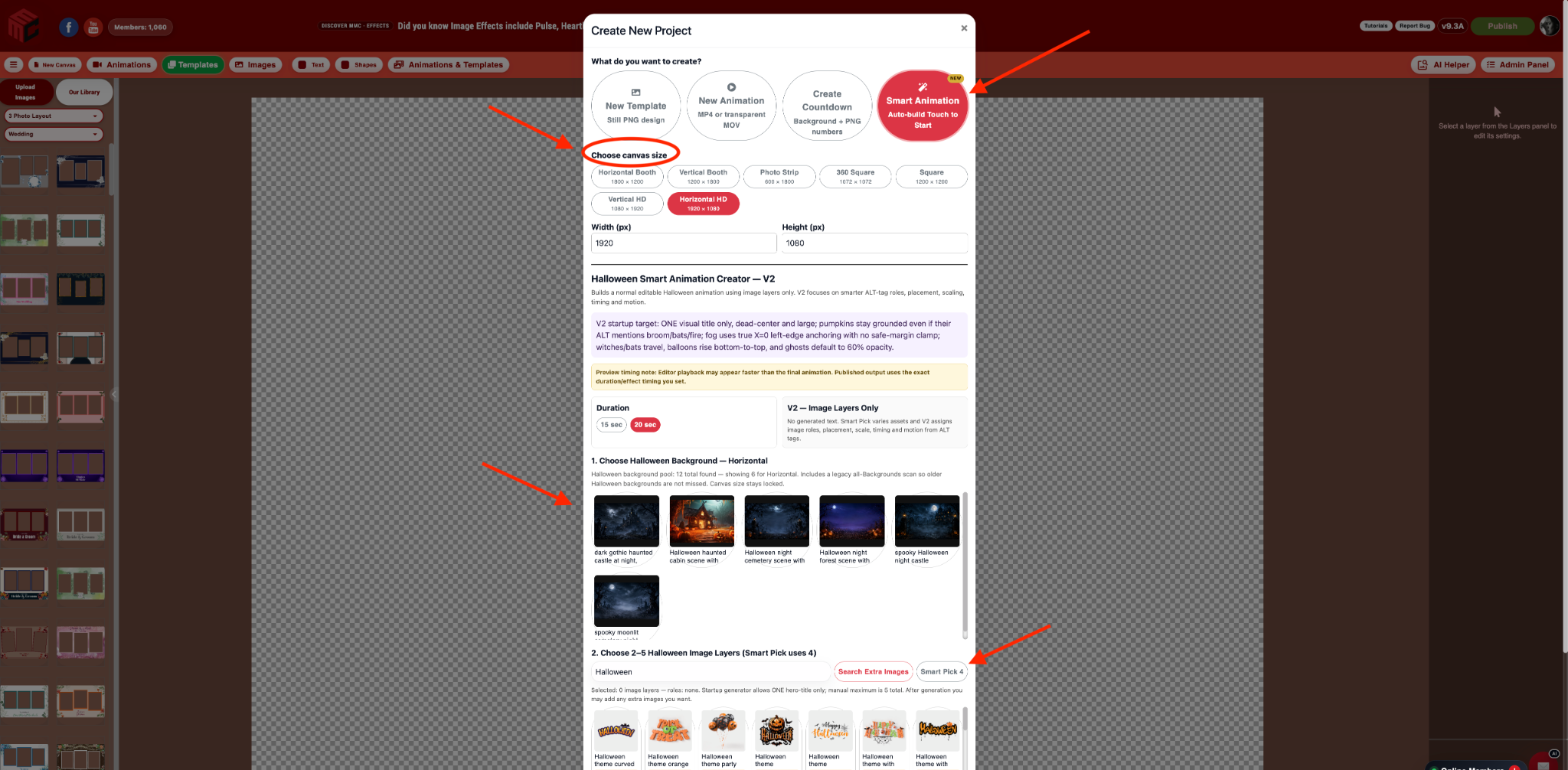
A real look at the Smart Animation Creator workflow
The screenshot above is the real MyMirrorClub Smart Animation Creator screen. The Halloween workflow is intentionally simple:
- Choose a background. Pick one of the Halloween backgrounds available in MyMirrorClub.
- Choose 15 or 20 seconds. The selected duration becomes the length of the generated attract animation.
- Choose decorations. Use Smart Pick 4 for an automatic composition, or manually select from 2 to 5 Halloween decoration images.
- Click Create Smart Animation. MyMirrorClub builds the project, places the layers, assigns suitable motion/effects and creates the Timeline.
Smart Pick is more than random placement
The goal is not to throw four images onto the canvas. Smart Animation Creator uses the asset information and the current Halloween composition rules to decide what each image is trying to do.
For example, the current Halloween V2 logic can treat a wide fog or smoke image as atmosphere, keep pumpkins and jack-o'-lanterns near the ground, preserve a visual title as the main hero element, reduce ghost opacity, and recognize flying assets such as witches or bats that can travel across the scene.
This gives the generated project a useful starting structure instead of making every element behave the same way.
Automatic Timeline creation
When Smart Animation creates the project, it also builds the Timeline. That means you do not need to manually add every generated decoration to the Timeline one by one before you can preview the result.
The background stays visually dominant while supporting elements receive their own placement and animation behavior. The generated result is still a normal MyMirrorClub project, so you can open the Timeline and continue adjusting it exactly like a project you built manually.
Every generated layer stays editable
Automation should save setup time without locking you into the first result. After Smart Animation builds the project, you can still:
- Move and resize generated images.
- Change image opacity.
- Change or remove an image effect.
- Adjust Timeline timing.
- Replace an automatically selected decoration.
- Add more text, images or other MyMirrorClub elements manually.
- Fine-tune the composition before publishing.
Why Halloween is the first Smart Animation category
Halloween is a strong test for automated composition because the artwork can have very different jobs. A title graphic belongs near the visual center. Fog needs to behave like atmosphere. A pumpkin belongs near the bottom. A witch or bat may need real cross-screen travel. A ghost may need lower opacity so it feels integrated into the scene.
Building these rules first gives Smart Animation Creator a foundation that can later be adapted to other event categories rather than relying on one generic animation recipe for everything.
Current V2 development status
Smart Animation Creator is an active development feature. Halloween is the first category and the current V2 work is focused on layer intelligence, reliable placement, role classification, opacity, travel behavior and Timeline parity.
An earlier Smart Animation text path automatically created a “Touch to Start” text layer. That automatic text path is currently disabled while the V2 image/layer workflow is refined. You can still add and style your own text normally in the MyMirrorClub editor after the Smart Animation is created.
This is why the current workflow shown in the screenshot focuses on the background, duration and decoration layers instead of promising a text layer that is not part of the active V2 generator.
Built from the MyMirrorClub image library
Smart Animation Creator works with MyMirrorClub's existing visual asset system rather than creating a separate locked asset format. Halloween backgrounds and transparent decoration PNGs can be discovered from the existing image library and their descriptive metadata.
You can browse additional artwork through Photo Booth Backgrounds & Extra Images, explore the wider catalog in Search, and continue editing the finished project in the MyMirrorClub Editor.
From minutes of setup to a smart starting point
The biggest benefit is speed. A traditional attract animation may require choosing the background, adding several transparent images, resizing each one, positioning every layer, deciding which effect belongs on each asset, setting opacity and then building the Timeline.
Smart Animation Creator is designed to handle that first setup pass automatically. You still have creative control, but you begin with a composed project instead of an empty canvas.
Designed to expand beyond Halloween
Halloween is the first style, not the final destination. The Smart Animation framework is being developed so the same idea can grow into additional event categories such as weddings, corporate events, Christmas and casino themes, with each category receiving rules that fit its own artwork and event style.
Smart Animation and Countdown Creator can work together
MyMirrorClub is also speeding up another common photo booth workflow with the Countdown Creator. Countdown Creator automatically builds 3- or 5-second countdown projects from built-in packs, MyMirrorClub assets or your own uploads, while Smart Animation Creator is focused on longer 15- or 20-second animated event screens.
Together, these tools are part of the same goal: spend less time building repetitive Timeline structure and more time customizing the final experience for your client.
FAQ: What is MyMirrorClub Smart Animation Creator?
Smart Animation Creator is a MyMirrorClub workflow that automatically builds the starting composition and Timeline for an animated project from a selected background and decoration images.
FAQ: Is Smart Animation Creator fully finished?
Not yet. The current Halloween V2 workflow is actively being refined and is clearly marked under construction. The working generator is focused on image-layer intelligence, composition and Timeline creation.
FAQ: How long are Smart Animation projects?
The current Halloween workflow supports 15-second and 20-second animations.
FAQ: What does Smart Pick 4 do?
Smart Pick 4 automatically selects four Halloween decoration assets and uses the current composition rules to give them different roles, positions and behaviors instead of applying one identical effect to every layer.
FAQ: Can I choose my own decorations?
Yes. Instead of Smart Pick 4, you can manually choose between 2 and 5 decoration images for the project.
FAQ: Can I edit the animation after it is generated?
Yes. Smart Animation creates normal editable MyMirrorClub layers and a normal Timeline. You can move, resize, restyle, replace or retime the generated elements before publishing.
Try MyMirrorClub and follow Smart Animation as it grows
Open the MyMirrorClub Editor to create and customize photo booth projects, or create an account and start exploring the workflow. New users currently receive one free credit at signup, giving you a way to try MyMirrorClub before deciding what you want to build next.
Smart Animation Creator is still growing, but the direction is simple: choose the ingredients, let MyMirrorClub build the smart starting point, and keep full control of the final animation.