The MyMirrorClub Flip Book Photo Album editor has received one of its biggest upgrades yet. What started as a working legacy album editor has been transformed into a much more practical production workspace for photo booth owners who want to build, organize and publish complete digital albums without fighting the interface.
This was not one single cosmetic change. We worked through the full editing flow: page management, persistent layers, text editing, font selection, image access, templates, Ready Albums, photo slots, navigation, performance and publishing safety. The goal was simple: make Flip Book creation feel faster, clearer and much easier to control.
See a Live Flip Book Photo Album Example
Want to see what a finished Flip Book Photo Album looks like from the guest or client side? Open our live example and flip through a completed album in your browser.
View the Live Flip Book Photo Album Example →
A real Pages workspace
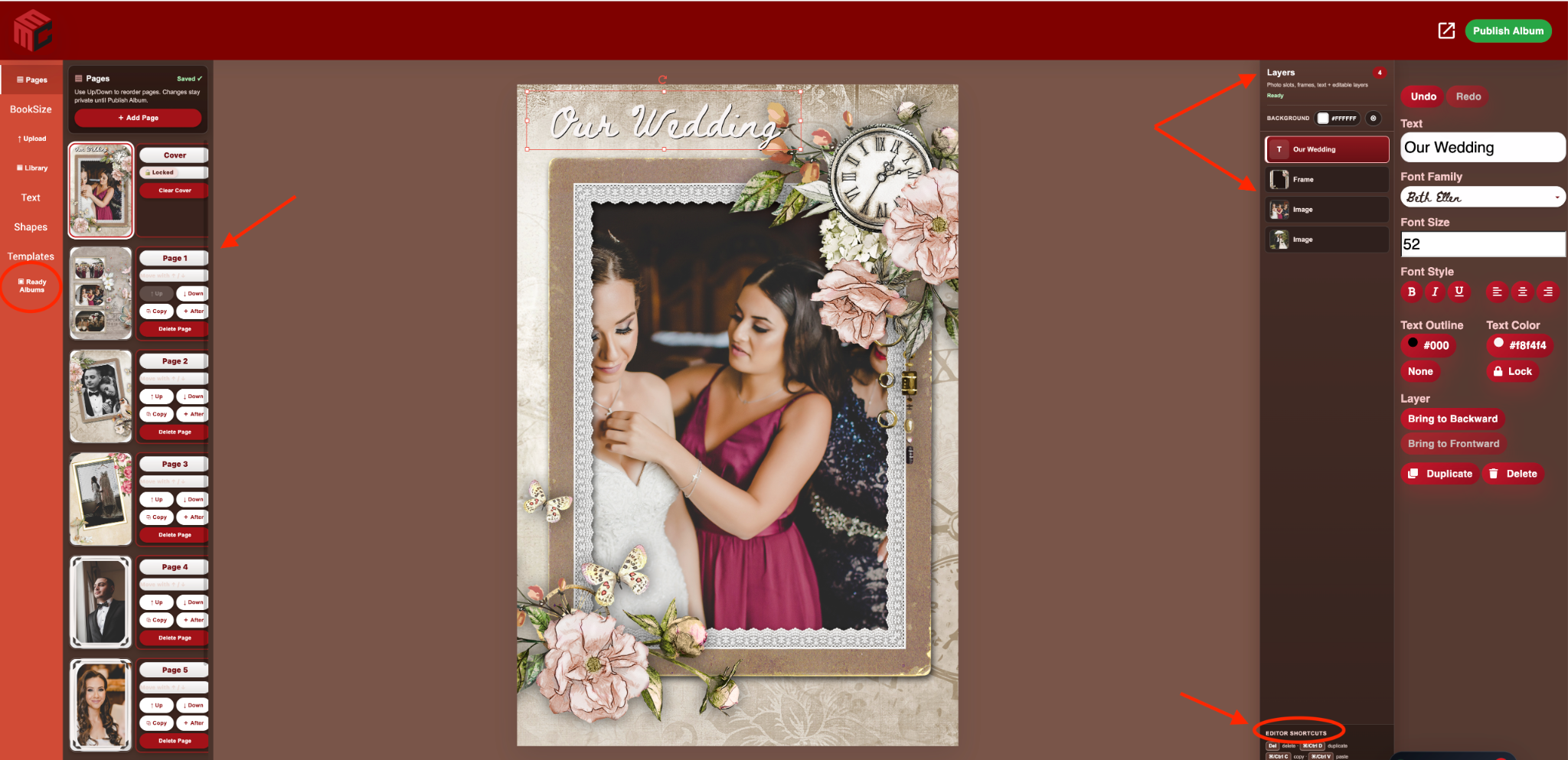
The biggest change is the new Pages workflow. Instead of treating every album page like a small thumbnail with hidden actions, pages now have clear controls that stay visible and are much easier to understand.
- The Cover stays locked in the first position so it cannot be accidentally moved or deleted.
- Normal pages can be reordered with drag-and-drop.
- Move Up and Move Down controls provide a precise fallback for page ordering.
- Copy lets you duplicate a designed page instead of rebuilding the same layout.
- Insert After creates a new page exactly where you need it.
- Delete Page removes the page from the private draft safely.
- Page numbering is clear: Cover, Page 1, Page 2, Page 3 and so on.
The selected page is visually obvious, the page strip scrolls properly even on larger albums, and page actions no longer hide over busy artwork.
Safer page editing with private autosave
Page structure changes are now handled inside the mounted editor instead of relying on risky reload-based behavior. Reordering, copying, inserting and deleting pages update the active editor state together, helping prevent stale page arrays or page-number gaps.
Your working album is also treated as a private draft. Changes are saved while you work, but the public album is not replaced until you deliberately choose Publish Album. That means you can reorganize a full album without immediately changing what a client may already be viewing.
Persistent visual Layers are always available
The right side of the editor now includes a dedicated Layers workspace that stays visible beside the object properties. This is a major improvement when a page contains frames, images, text and decorative elements stacked on top of one another.
Layers are shown front-to-back with useful identification, selection highlighting and lock state. Image and frame layers can show visual thumbnails, while text layers show a readable text preview. Clicking a layer selects the exact object on the canvas, even when that object is buried behind another layer.
This makes detailed pages much easier to edit because you no longer have to move a frame just to reach the photo underneath it.
Keyboard shortcuts for faster editing
Flip Book editing now supports practical shortcuts that make repetitive design work much faster. You can delete, duplicate, copy, paste, undo, redo, nudge with the arrow keys and use larger Shift plus Arrow nudges for faster positioning. The shortcuts automatically stay out of the way while you are typing into text fields.
A compact shortcut reminder is also visible in the editor so you do not have to memorize everything before using it.
Better text editing, including multiline text
Text editing was improved so you can work more naturally directly on the page. Multiline text is supported, text boxes can grow when another line is added, and sizing calculations use the longest line instead of shrinking the entire block just because you pressed Enter.
Direct inline editing is also more reliable. You can edit text on the canvas without accidentally dragging the object underneath it, and text labels in the Layers panel stay clean and readable.
A much better Font Family experience
The Flip Book font workflow has also been modernized. Instead of forcing you to work through a basic list with no visual clue, the editor now has a searchable visual Font Family browser that lets you preview font styles before choosing one.
The font system was designed carefully around the older Flip Book editor so it does not return to the browser-freeze problems we found during development. Font previews are handled on demand and only the visible choices are loaded while the browser is open, keeping the editor responsive.
Upload and Library are now clear, separate choices
Image handling is more predictable too. Upload and Library are now clear separate paths instead of leaving you stuck in an ambiguous Image state.
The Flip Book Library uses the shared MyMirrorClub image collection and gives you a lightweight browser with folders, thumbnails, remembered selections, loading feedback and retry handling. Choose an image and it is added through the existing album editor without destroying the legacy editor underneath.
Built-in Page Templates and Ready Albums
The Templates area has grown well beyond a simple list of page images. MyMirrorClub now supports clearer built-in Page Templates, and the larger Ready Albums workflow gives members a fast starting point for complete albums.
Ready Albums include finished event-oriented pages such as Cover, Hero, multi-photo layouts, Story, Collage, Details and Closing pages. They use editable text, design layers and pre-framed Photo Slots rather than one flattened picture, so you can still customize the album after loading it.
Photo Slots are designed to stay in the correct position and layer order. Select a slot, choose Upload or Library, and the chosen photo replaces the slot instead of dropping a loose image on top. Friendly names in the Layers panel make it easier to see which photo belongs where.
Editable frames and better photo-slot control
Photo areas are no longer just locked visual decorations. The Flip Book improvements use real editable photo layers and real Border Frame layers, so the photo and its frame can be selected, moved, resized and adjusted when you want more control.
That also works well with the newer MyMirrorClub Corner Radius controls. Images, rectangles, Border Frames and transparent photo openings can use Square, Soft, Round or a custom radius, making album pages feel more polished and consistent.
Cleaner navigation and fewer panel conflicts
We also cleaned up the navigation so Pages, Upload, Library, Text, Shapes, Page Templates and Ready Albums behave like separate tools instead of fighting for the same panel space. Opening one workspace no longer leaves another panel covering the top of it, and returning to a tool takes you back to the correct state.
Behind the scenes, several old hover loops, permanent polling behaviors and unnecessary redraws were removed or reduced. Those changes matter because the Flip Book editor is a large legacy application; making it feel smoother required improving how the existing editor is used rather than simply piling more interface on top.
Publishing stays deliberate
All of these improvements are built around a simple safety rule: editing the private draft should not unexpectedly replace the live album. Publish Album remains the deliberate final step that renders and commits the album for viewing and delivery.
That gives photo booth owners room to experiment with page order, templates, images and wording while keeping the published result under control.
Built for real photo booth workflows
These Flip Book upgrades are part of the larger MyMirrorClub goal: keep adding the tools photo booth owners actually need so more of the production workflow can stay in one place.
If there is something you would like to see improved in Flip Book or anywhere else in MyMirrorClub, send us a feedback request. Many of the improvements in this release came from noticing the small things that slow editing down and then fixing them one by one.
See a Live Flip Book Photo Album Example →
Open MyMirrorClub and create your Flip Book Photo Album →
FAQ: Can I reorder pages in a Flip Book album?
Yes. Normal pages can be reordered with drag-and-drop or with the visible Move Up and Move Down controls. The Cover stays protected in the first position.
FAQ: Can I duplicate a page instead of rebuilding it?
Yes. Use Copy to duplicate a designed page, then edit the new copy. You can also insert a new page directly after an existing page.
FAQ: Does Flip Book have a Layers panel now?
Yes. A persistent visual Layers workspace helps you select text, images, frames and other page objects, including layers that are difficult to click directly on the canvas.
FAQ: Can I preview fonts before choosing one?
Yes. The enhanced Font Family browser is searchable and visual, so you can preview the available font styles before applying one to your text.
FAQ: What are Ready Albums?
Ready Albums are pre-designed multi-page album starting points with editable wording, styled pages, photo slots and frames. You can replace the photos and personalize the design instead of building every page from scratch.