🪞 Featured image

Smart Guides Without the Glue: Zero-Pull Layer Editing Is Now Live in MyMirrorClub

Moving a layer in a photo booth design should feel precise, not like the object is fighting your mouse. We noticed that the editor guide lines could someti...

📅 September 13, 2026 ⏱️ 4 min read Updated September 13, 2026

Moving a layer in a photo booth design should feel precise, not like the object is fighting your mouse. We noticed that the editor guide lines could sometimes feel too aggressive when you were trying to make small positioning adjustments. The guides were useful, but the magnetic pull could make a layer feel like it was being glued to an alignment point.

That behavior has now been improved. MyMirrorClub Smart Guides remain visible, but their magnetic pull is now zero. You still get the visual help of alignment and spacing guides, while the selected layer follows your pointer smoothly and stays exactly where you choose to place it.

The guides stay. The glue is gone.

We did not want to remove Smart Guides because they are extremely useful when building photo booth templates, animations and other layouts. Instead, we changed how they behave while you drag a layer.

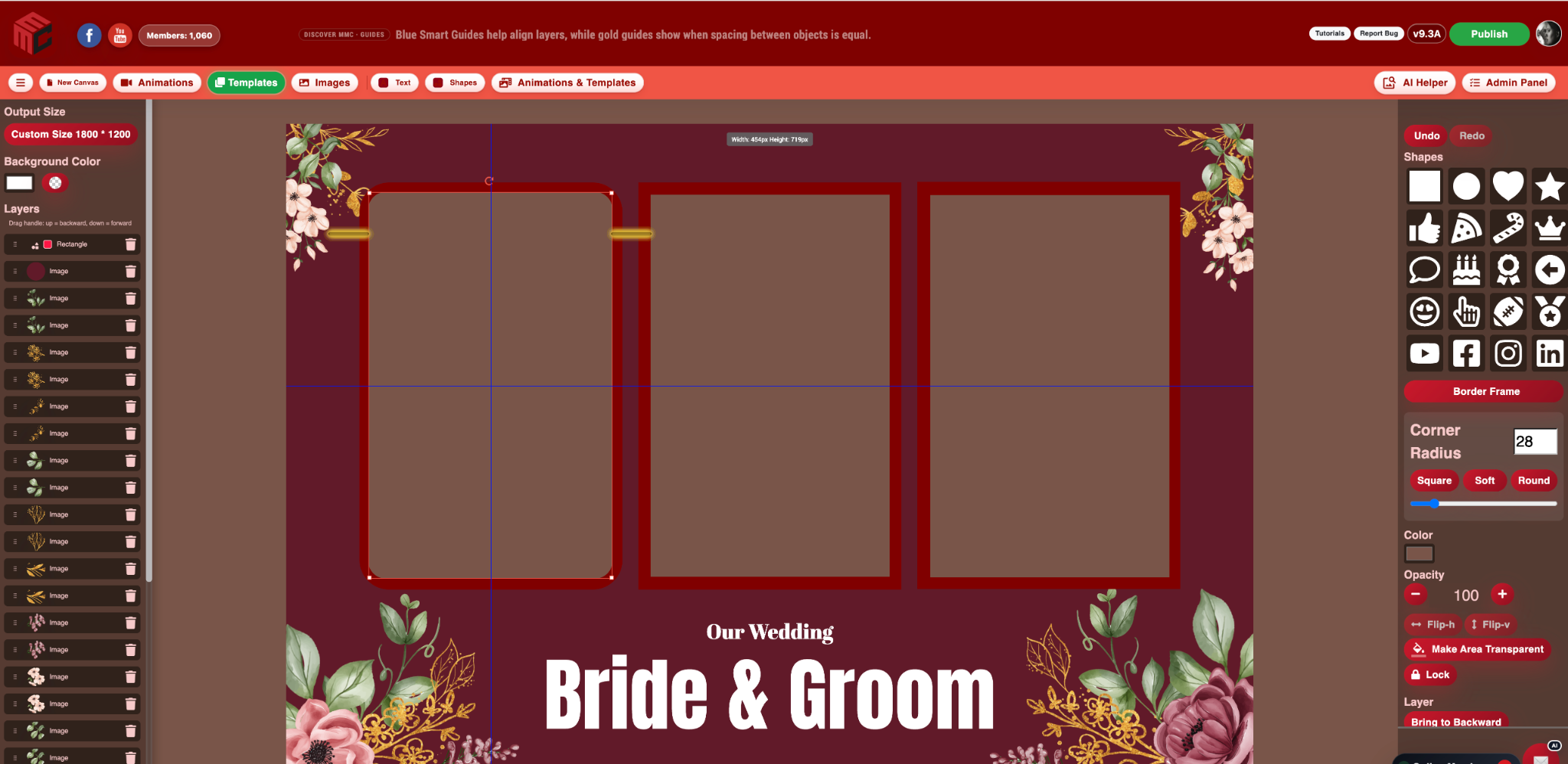
Blue guide lines continue to help you see when layers line up with important edges, centers and other objects. Gold guide lines continue to show equal spacing between objects. The difference is that those guides are now visual references only. They no longer force the selected layer into position.

  • Guide lines remain visible while dragging.
  • Center and edge alignment references remain available.
  • Equal-spacing guides remain available.
  • Magnetic snapping and positional pull are removed.
  • The layer follows your mouse or pointer smoothly with zero force.

Why this makes editing noticeably better

When you are designing a photo booth layout, a few pixels can matter. Photo openings need to line up with Border Frames. Decorative elements may need a tiny adjustment. Text may look better just slightly off a guide position. With magnetic snapping, those small movements could become frustrating because the layer wanted to jump back toward the guide.

With the new zero-pull behavior, you can use the guide line as a reference and still place the object exactly where it looks best. That makes it much easier to fine-tune images, photo frames, transparent photo boxes, text, shapes and decorative layers without fighting the editor.

Blue alignment guides and gold equal-spacing guides still do their job

The blue lines give immediate alignment feedback, while the gold indicators help show consistent spacing between objects. You can see the relationship between your layers as you move them, but the editor no longer takes control of the final position.

This gives you the best of both worlds: visual precision without forced movement.

Built from real editing feedback

MyMirrorClub continues to improve around the way photo booth owners actually work. Sometimes a feature can be technically correct but still feel inconvenient during everyday use. When we notice that, or when members point it out, we want to improve the workflow rather than simply leave it alone.

The zero-pull guide update is a perfect example. Smart Guides are valuable, so we kept them. The magnetic glue was slowing down precise editing, so we removed that part.

Open the MyMirrorClub Editor →

FAQ: Did MyMirrorClub remove the Smart Guide lines?

No. The guide lines are still visible. Blue guides continue to help with alignment, and gold guides continue to help identify equal spacing. Only the magnetic pull was removed.

FAQ: Will layers still snap to the guides?

No. The current guide behavior is visual-only. Layers follow your pointer smoothly with zero magnetic force, so you decide the exact final position.

FAQ: Why is zero-pull editing better for photo booth layouts?

It makes small adjustments easier. You can still see useful alignment and spacing references without having the layer jump or stick to a guide when you are trying to position it a few pixels differently.
Main MyMirrorClub resources for photo booth owners

Keep learning and buying from the main MyMirrorClub pages: the Search Store for single photo booth templates and animations, Template Bundles for instant ZIP packs, the photo booth templates hub, the photo booth editor, wedding templates, 360 templates, overlays, and business tools for photo booth owners.

Photo booth templatesEditable wedding, birthday, corporate, photo strip, mirror booth and 360 layout ideas. Photo booth template bundlesCurated instant-download packs for customers who want selected template files without a full membership. Photo booth animation bundlesSelected animation and motion-graphic packs for booth screens, event loops and touch-to-start designs. Event photo booth templatesA central hub for wedding, birthday, corporate, school, holiday, casino, 360 and mirror booth designs. Party photo booth templatesBirthday, holiday, school, corporate, kids, casino and private celebration booth designs. Branded photo booth templatesLogo-ready frames, sponsor overlays, trade show graphics and business event booth designs. School photo booth templatesSchool dance, homecoming, prom, graduation and student event design ideas. Photo booth animationsAnimated start screens, mirror booth animations, countdowns and event motion graphics. Mirror booth animationsMagic mirror start screens, welcome animations, countdowns and screen-ready motion graphics. Photo booth editorTry the online editor, load templates and animations with AI Helper, then quick edit booth-ready layouts. Photo booth backgrounds and extra imagesBackgrounds, extra images, themed graphics and design assets for editable MyMirrorClub layouts. Wedding photo booth templatesElegant overlays, floral layouts, gold designs, photo strips and matching wedding booth assets. Wedding photo booth overlaysElegant frames, floral overlays, gold designs, monograms and matching wedding booth graphics. Engagement and anniversary photo booth templatesProposal party overlays, anniversary layouts, couple photo strips and romantic booth graphics. Birthday photo booth templatesKids party layouts, Sweet 16 designs, milestone birthday overlays, photo strips and matching birthday booth assets. Baby shower photo booth templatesGender reveal overlays, boy and girl themes, floral layouts, photo strips and matching baby shower booth assets. Seasonal photo booth templatesChristmas, Halloween, Valentine, New Years, St Patrick, Cinco de Mayo and holiday booth graphics. Christmas photo booth templatesHoliday party overlays, Santa layouts, winter photo strips, corporate Christmas designs, mirror booth screens and 360 overlays. Halloween photo booth templatesSpooky party overlays, haunted layouts, pumpkin designs, trick or treat photo strips, fall festival graphics and 360 overlays. Valentine photo booth templatesRomantic party overlays, red and pink layouts, Galentine designs, sweetheart photo strips, school dance templates and 360 overlays. New Years photo booth templatesCountdown party overlays, midnight layouts, black and gold designs, champagne photo strips and 360 overlays. Casino and Gatsby photo booth templatesCasino night, Roaring 20s, poker, black and gold, photo strip and themed booth graphics. Corporate photo booth templatesBranded overlays, trade show layouts, company party templates and sponsor-ready booth graphics. Corporate event photo booth overlaysBranded frames, sponsor layouts and product launch booth graphics. Trade show photo booth templatesExpo, convention, sponsor event and brand activation design ideas. Photo strip templates2x6 photo booth strips, vertical layouts, wedding strips, birthday strips and print-ready booth designs. 360 photo booth templatesBranded 360 booth layouts, square video designs, social clip templates and event graphics. 360 photo booth overlaysSquare overlays, branded video frames and event-ready 360 booth graphics. Photo booth marketing toolsConnect creative assets, website pages, booking paths, SEO content and business growth resources. Photo booth business toolsTemplates, animations, website help, BoothPal booking direction and SEO resources in one hub. Search LibraryBrowse templates, animations, backgrounds, overlays and extra images. Open editorCustomize templates and build event-ready photo booth designs.

Contact Us

Thank you! Your message has been sent successfully.
Oops! Something went wrong. Please try again.