Building a powerful creative platform means more than adding new features.
It also means constantly testing existing tools, finding unexpected behavior, listening to users and fixing problems as soon as we discover them.
At MyMirrorClub, that process never stops. Our goal is to make the Photo Booth Template & Animation Editor as reliable, easy to use and as close to bug-free as possible.
Sometimes a small workflow test uncovers something important
A feature can look perfectly correct on the canvas and still behave differently somewhere else. An image might appear while designing but fail in the Timeline, reopen differently from the Library, or disappear when the project is published.
That is why we test the full creative workflow instead of stopping once something looks right on screen.
Add ? Edit ? Resize ? Save ? Reopen ? Timeline ? Preview ? Publish ? Download
Following the complete workflow is often where hidden problems are discovered.
Recent editor issues we found and fixed
While testing recent editor improvements, we found several issues involving saved layers, Library imports, AI Helper, animation timing and image resizing. We corrected the underlying workflows rather than asking users to work around them.
- Custom layer names stay attached when projects are archived to the Library and brought back into the editor.
- Single-image Library items keep their saved layer metadata instead of returning as a generic Image layer.
- First-image canvas choice is preserved, so a blank project can ask whether to Keep Canvas or Match Image Size.
- Images added to animation projects use the full animation duration when they are meant to remain visible for the complete animation.
- AI Helper image paths now match the normal Images workflow, keeping those images visible in the editor, Timeline, preview and published output.
- AI Helper returns the workspace to Layers after adding an asset, so creators immediately see what was added instead of wondering where the layer controls went.
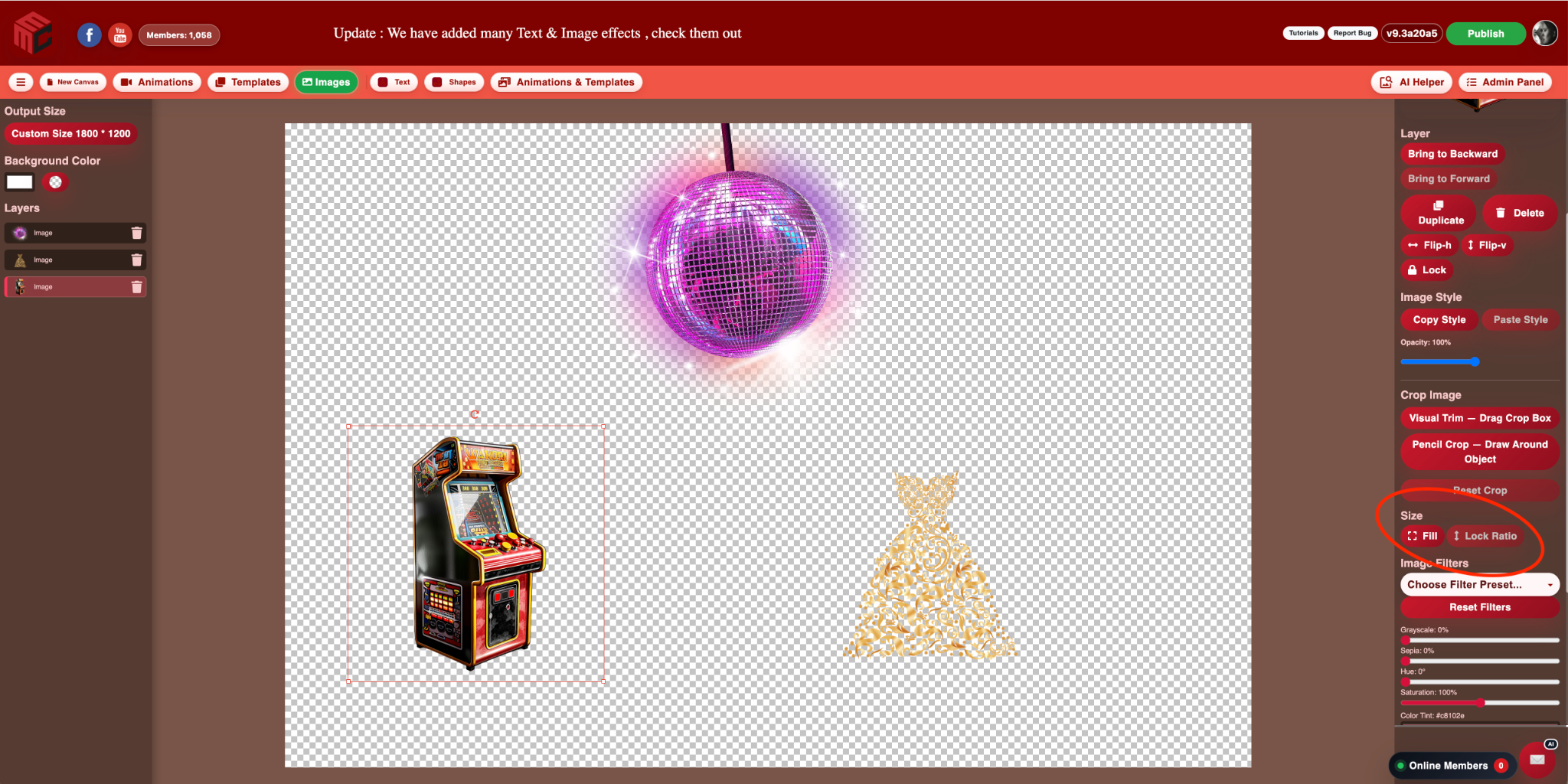
- New image layers default to Lock Ratio, making proportional resizing the safer starting point while Fill remains available whenever it is needed.
Individually these can sound like small details. Together they make a major difference to how natural and dependable the editor feels.
Why real user reports matter
MyMirrorClub includes many tools, editing combinations, canvas sizes, templates, animations and different ways of building projects. Creators also use different browsers, computers and workflows.
That means a user may sometimes discover a situation we have not encountered yet.
If that happens, please tell us.
The Report Bug button is available directly inside the MyMirrorClub editor. If something does not behave the way you expect, send us a report - even if the problem seems small.
What should you report?
If something feels wrong, it is worth telling us. Useful reports can include things such as:
- An image that appears in the editor but disappears after publishing.
- A Timeline layer that starts or ends at the wrong time.
- A saved layer that reopens differently.
- A button or panel that becomes stuck.
- An image that resizes in an unexpected way.
- A template, animation, crop, effect or publishing result that does not match what you saw in the editor.
You do not need to know what caused the problem. Just tell us what happened and what you were doing when you noticed it.
Screenshots help us reproduce problems faster
When possible, include a screenshot and a short description of the steps that led to the issue.
For example:
"I created a new animation, added an image through AI Helper, and the image appeared on the canvas but not in the Timeline or published animation."
That kind of information helps us reproduce the exact workflow and get to the real cause much faster.
One bug report can help every MyMirrorClub creator
When one person reports a legitimate problem and we fix it, that correction helps every other creator who might eventually run into the same situation.
You are not simply reporting something that went wrong. You are helping improve the platform for the entire MyMirrorClub community.
New features matter - stability matters just as much
We love adding useful creative tools such as Pencil Crop, advanced Text Shadow controls, custom layer names, image effects, animation effects, smart guides and faster editing workflows.
But adding features without maintaining the foundation underneath them would eventually make the editor harder to use.
Our approach is simple:
- When we find something that needs correction, we fix it.
- When a workflow can be easier, we improve it.
- When a creator reports a genuine problem, we investigate it.
- Then we keep testing.
Help us build a better MyMirrorClub
Our goal is to give photo booth professionals a dependable creative workspace for building templates, animations, overlays and event designs.
We will continue actively looking for bugs ourselves, but real-world creative workflows will always test a platform in ways that are difficult to reproduce every day.
So if you find something, Report It. We want to know.
Together we can keep making MyMirrorClub faster, easier, more stable and better with every update.
Create. Test. Improve. Repeat.
FAQ: How do I report a bug in MyMirrorClub?
Open the editor and use the Report Bug button in the top toolbar. Describe what happened and, when possible, include a screenshot or the steps that produced the issue.
FAQ: Should I report a small problem?
Yes. A small visual or workflow issue can reveal a larger problem that affects other creators, saved projects, Timeline playback or published output.
FAQ: What information helps the most?
Tell us what you were doing immediately before the problem appeared, what you expected to happen, what actually happened, and whether the issue happened in the editor, Timeline, preview, publishing or after reopening a saved project.
FAQ: Does MyMirrorClub actively test new updates?
Yes. New and existing workflows are tested across editing, saving, reopening, Timeline behavior, preview and publishing. User reports add another important layer of real-world testing.
Keep creating - and keep us informed
Open the MyMirrorClub editor, explore the latest tools, and if something does not behave correctly, please use Report Bug so we can investigate it.
New users can also create a free MyMirrorClub account and receive one free publishing credit to try the editor.